Network Clients
We have been working with Inter-process Communication (IPC) between processes running on a single computer. We want to look at IPC between processes that may be running on separate computers. In that case we need the computers to be connected by a "network", a system of wires, radios, and I/O devices that can transmit bytes of data from one computer to another.
Just as IPC on a single computer needs several abstractions, like streams, files, and pipes, IPC over a network needs several new abstractions, like sockets, addresses, URLs, clients, and servers.
In this document we will introduce the client/server model of networked IPC and then look at Java code for the client side of the model.
Here are links to a number of introductory chapters about networks and Java network programming. They all contain good examples and have a variety of ways of explaining the ideas behind the Internet.
- Chapter 22: Internet Networking from "Big Java: Late Objects", 2nd Edition
- Chapter 33, Networking (code) from Introduction to Java Programming and Data Structures
- Chapter 28, Networking (code) from Java How to Program, 11th Edition
- Learning Java, 5th Edition
- Chapter 8, Network Programming (code) from More Java 17
- Section 11.4, Networking (PDF) (code)
- Chapter 12, Network Programming (code) from Carleton University
- Chapter 15: Client-Server, Networking, and Sockets (PDF) from Java Java Java
- Chapter 13 Socket Programming from Object Oriented Programming with Java
- Java Networking
- Trail: Custom Networking
- Socket Communications
All the example code mentioned in this document is in the following zip file.
Client/Server Model
We have been working with Inter-process Communication (IPC) between processes running on a single computer. We have used several IPC mechanisms, command-line arguments, environment variables, files, pipes, streams, etc.
When two processes run on the same computer, the operating system acts as an intermediary in all forms of IPC. The operating system relies on its control of the computer's physical memory and storage devices to implement each IPC mechanism. For example, a "pipe" is an array of bytes in physical memory (a buffer) that the operating system writes to and reads from on behalf of the two processes on either end of the "pipe". Since the operating system has total control over the computer's physical memory and storage devices, it can use them as communication channels while maintaining system stability and enforcing system security policies.
Here is a picture that illustrates two processes running on a single host
computer using a pipe for IPC. Notice that the each process uses a stream
to communicate with the pipe, an OutputStream connects to the input of
the pipe and an InputStream connects tot he output of the pipe.
                                    Host_1
  +----------------------------------------------------------------------------+
  |                                                                            |
  |                 process_A                    process_B                     |
  |               +-----------+                +-----------+                   |
  |               |           |      pipe      |           |                   |
  |  keyboard >-->> 0       1 >>---0======0--->> 0       1 >>---+---> console  |
  |               |           |                |           |    |              |
  |               |         2 >>---+           |         2 >>---+              |
  |               |           |    |           |           |    |              |
  |               +-----------+    |           +-----------+    |              |
  |                                |                            |              |
  |                                +----------------------------+              |
  |                                                                            |
  +----------------------------------------------------------------------------+
We want to look at IPC between processes that may be running on separate computers. In this case, there is no shared operating system that can act as the intermediary for the IPC. We need a new resource that the two processes can share. The new resource is a network, a system of wires, radios, and I/O devices that can transmit bytes of data from one computer to another.
A network is primarily a collection of hardware devices (with some software running on them). We will not say too much about what a network really is (just as we haven't said too much about what an operating system really is). We will concentrate on the most important abstractions that the network provides us (just as we concentrated on the abstractions provided by an operating system, like processes, streams, pipes, and files).
For our point of view, the basic abstractions created by the network are sockets, IP addresses, ports, servers, and clients.
Here is a picture that illustrates two processes running on two computers
using two sockets for IPC. Notice that each process uses two streams to
communicate with its socket, an InputStream and an OutputStream. The two
sockets communicate with each other using a (bidirectional) network connection.
                client_host                                              server_host
+-------------------------------------------+                 +---------------------------------+
|              client_process               |                 |               server_process    |
|              +-----------+                |                 |               +-----------+     |
|              |           |                |                 |               |           |     |
| keyboard >-->> 0       1 >>--+--> console |                 |           >-->> 0       1 >>--> |
|              |           |   |            |                 |               |           |     |
|              |         2 >>--+            |                 |               |         2 >>--> |
|              |           |       socket   |                 |   socket      |           |     |
|              |           |      +------+  |                 |  +------+     |           |     |
|              |         3 >>---->>      |  |   tcp network   |  |      <<---<< 3         |     |
|              |           |      |      O=======================O      |     |           |     |
|              |         4 <<----<<      |  |   connection    |  |      >>--->> 4         |     |
|              |           |      +------+  |                 |  +------+     |           |     |
|              +-----------+                |                 |               +-----------+     |
+-------------------------------------------+                 +---------------------------------+
In the above picture, the relationship between the two processes is not symmetric. One process is the server and the other process is the client.
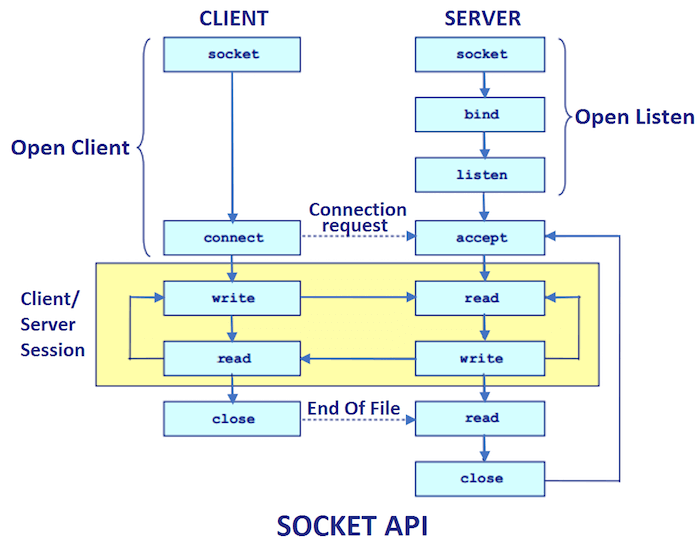
The distinction between a "server" and a "client" can be made from two points of view. The technical (are really correct) point of view is that a server is a process that has a "server socket" and a client doesn't. We will look at the details of this distinction in the next document about socket programming.
The more common way to distinguish a "server" from a "client" is by the role each plays in the network connection. A server is a process that provides some kind of service (a computation) for any process that makes a request to the server. A client process is any process that makes a request to some server. We say that a server receives a request message from a client and the server sends a response message back to the client.
A server can provide any kind of computational service for its clients. For example, a server could do database lookups for its clients. A server could do mathematical calculations for its clients. A server could upload and download files for its clients. Usually, a server provides just one kind of computational service (the single responsibility principle). So a server could be a "database server" and do just database lookups. Or a server could be a "file server" and only upload and download files.
The client/server distinction can be subtle. First, the distinction is not about computers, it is about processes. A server is always a process. If we refer to a computer as a "server computer", then we really mean that the computer is running a server process. But the computer could actually be running several server processes. And a computer running a server process can also be running a client process, so the "server computer" can also be called a "client computer". Second, a "server process" can also be a "client process". If a server process needs some help in implementing its service, the server process may connect to a second server process to ask it to do some task (for example, a database lookup). In that case, the first server process is a client process to the second server process.
Host, hostname, IP address, port number
In the client/server model, a client process sends a request message to a server process requesting that the server carry out a computation and send back a response message containing the result. In order for a client process to send a request to a server process, the client must have a way to specify three things. The client process must identify a computer system on the network, it must identify a server process running on that computer system, and it must specify the parameters of the computation it wants carried out by that server process. In this section we will explain that a computer system is identified by an "IP address" and a server process is identified by a "port number". In the next section, we will explain how a computation's parameters are encoded into a URL.
Computer systems that are connected to a network are referred to as hosts. The term host can refer to a computer system that runs server processes or a computer system that only runs client processes.
Every host that is connected to the Internet has a unique IP address (Internet Protocol address). An IP address is a 32-bit positive integer value, so there are about 4 billion IP addresses (more specifically, these are IPv4 addresses). We will not go into the details of how each host gets an IP address. We will just assume that every host has one and that no two hosts have the same IP address.
When a server process starts running, the server process is assigned a 16-bit number called a port number. The port number identifies that specific server process on that host.
The combination of an IP address and a port number, written as "ip:port",
uniquely identifies a server process among all the processes running on
all the hosts connected to the Internet. The combination of an IP address
and a port number is called a socket address. Java has a class,
InetSocketAddress, that is used to represent socket addresses.
A client process that wants to send a request to a server process must know the IP address of the host running the server process and it must know the port number of the server process (that is, the client must know the socket address of the server process). The host's IP address and the port number of the server process can either be hard coded into the source code of the client process, or, more likely, passed to the client process as runtime configuration parameters (for example, as command-line arguments). Below we will see that the IP address and port number of the server process can be encoded in a URL which can then be a parameter to the client process.
An IPv4 address is a 32-bit positive integer, but we do not write them that way. We do not say a host has "IP address 296351487". Instead, an IPv4 address is written as a "dotted quad", which looks something like "154.79.121.56". A dotted quad is a way to write 32-bit integers that is convenient for working with computer networks. A 32-bit integer is four bytes. Each field in a dotted quad represents one byte of the 32-bit integer. Each number in a dotted quad is the decimal value of that byte in the 32-bit integer, so each number in a dotted quad must be between 0 and 255.
There is another form of IP address, an IPv6 address. IPv6 addresses are quite a bit more complex than IPv4 addresses. An IPv6 address is a 128-bit positive integer. They are not written in a dotted notation. Instead, they are written as eight groups of four hexadecimal digits separated by colons, for example, "0e58:2db8:85a0:0000:0000:0000:07a0:0034". If there is a sequence of consecutive zero groups, it can be replaced with a double colon, like this "0e58:2db8:85a0::07a0:0034". Also, leading zeros in any group can be omitted, like this, "e58:2db8:85a0::7a0:34".
Java's Inet4Address class represents IPv4 addresses and Java's Inet6Address
class represents IPv6 addresses. These two classes are concrete subclasses of
the abstract InetAddress class. The InetAddress class also defines several
static methods for working with IP addresses. The Javadoc pages for Inet4Address
and Inet6Address have good explanations of the syntax for IPv4 and IPv6 addresses.
- java.net.InetAddress
- java.net.Inet4Address
- java.net.Inet6Address
- java.net.SocketAddress
- java.net.InetSocketAddress
If you want to see the IPv4 and IPv6 addresses of some well known hosts, open a command-line window and type the command "nslookup". At the prompt that follows, type the name of a host computer from the Internet.
    network_clients> nslookup
    > google.com
    > www.google.com
    > microsoft.com
    > pnw.edu
    > exit
IP addresses are not easy to work with and they are certainly not easy to remember. Most hosts that run server processes have an easy to remember hostname that can be used instead of the host's IP address.
It is important to know that hostnames are a convenience and they are not part of the Internet Protocol. A computer connected to the Internet must have an IP address but it need not have a hostname. Most Internet software will let you use a hostname instead of an IP address, but the software will immediately convert the hostname into an IP address and then use the IP address in all networking function calls. Converting a hostname into its IP address is called resolving the hostname.
An important part of the Internet is a service called the "Domain Name System" (DNS) that resolves hostnames into IP addresses. The "nslookup" command above uses DNS. Whenever a piece of Internet software needs to resolve a hostname, the software will use DNS. DNS is not part of the Internet Protocol. DNS is an application layer protocol that runs as a client/server service on top of the Internet Protocol.
Java's InetAddress class has several methods that can resolve a hostname
to its IP address and also do a "reverse name lookup" and convert an IP
address into a hostname.
Here is code that you can copy and paste into JShell that finds the hostname and IP address of the computer you are running JShell on.
var localHost = InetAddress.getLocalHost()
localHost.getHostName()
localHost.getCanonicalHostName()
localHost.getHostAddress()
The following block of code will get all the IP addresses associated with a hostname. Try different hostnames.
var hostname = "google.com"
var address = InetAddress.getByName(hostname);
address.getHostName()
address.getCanonicalHostName()
address.getHostAddress()
var addressList = InetAddress.getAllByName(hostname);
for (var addr : addressList) { System.out.println(addr.getHostAddress()); }
for (var addr : addressList) { System.out.println(addr.getCanonicalHostName()); }
The Java program "Resolve_IP_Addresses.java" in the
network_clients.zip
folder shows how to use Java's InetAddress class to resolve hostnames.
- Host
- Hostname
- IP address
- Dotted-decimal notation
- IPv6 address
- Port
- nslookup - Microsoft Learn
- nslookup - ubuntu man page
- nslookup - Wikipedia
URL (and URI)
A URL is a "Uniform Resource Locator".
URLs are a way of identifying resources on the Internet. A resource can be something concrete like an HTML web page, a CSS style sheet, a PNG image file, or a JavaScript source file. But a resource can also be something more abstract, like a database lookup, a search result, or an API call.
A URL contains the information needed to find a resource. A URL will contain the name of the remote host that the resource is stored on, and the name of the resource itself. In addition, a URL will specify a "protocol" to use when accessing the resource on the remote computer.
- What is a URL? - MDN
One important use for URLs is to encode a request from a client process to a server process in the client/server model.
Here is a (rough) syntax for a URL.
       url ::= scheme ':' '//' authority  path [ '?' query ] [ '#' fragment ]
 authority ::= [ userName '@' ] host [ ':' port ]
      host ::= ipv4-address | '[' ipv6-address ']' | hostname
      port ::= integer
      path ::= ( '/' segment )*
   segment ::= char*
The "host" specifies a remote computer. The "port" specifies a server process. The "path" and "query" specify a specific resource on the remote computer (the parameters to the server process in the client/server model). The "scheme" specifies a protocol. As we will see later, the scheme can also specify the server process, so the port number is not always needed in the URL.
A detailed syntax for URLs is in RFC 3986.
Here are two examples of parsing a URL that you can copy and paste into JShell.
var url = new URI("http://cs.pnw.edu:80/~rlkraft/cs33600/class.html#2026-03-10").toURL()
url.getProtocol()
url.getAuthority()
url.getUserInfo()
url.getHost()
url.getPort()
url.getDefaultPort()
url.getPath()
url.getFile()
url.getQuery()
url.getRef()
var url = new URI("https://google.com/search?q=pnw+cs+dept#:~:text=Purdue").toURL()
url.getProtocol()
url.getAuthority()
url.getUserInfo()
url.getHost()
url.getPort()
url.getDefaultPort()
url.getPath()
url.getFile()
url.getQuery()
url.getRef()
Every URL is also a URI. A URI is a "Uniform Resource Indicator". URIs are
more general than URLs. Since URIs are more general than URLs, the Java URI
class can do several manipulations of URLs that the URL class cannot do.
The modern Java way to work with URLs is to instantiate a URI object, parse
and manipulate the URI object, and then, if a URL object is needed, convert
the URI object into a URL object by calling the toURL() method.
Here is an example of parsing a URI. One difference between URI objects and
URL objects is that a URI object knows nothing about the meaning of the URI
that it represents. For example, a URI object does not know the default port
used by the protocol named by the scheme.
var uri = new URI("https://google.com/search?q=pnw+cs+dept#:~:text=Purdue")
uri.getScheme()
uri.getAuthority()
uri.getUserInfo()
uri.getHost()
uri.getPort()
uri.getPath()
uri.getQuery()
uri.getFragment()
uri.isAbsolute()
uri.isOpaque()
In the network_clients.zip folder the programs "Parse_URL.java" and "Parse_URI.java" demonstrate more code examples of parsing URLs and URIs.
Most of the URIs that we will use are in fact URLs. The only kind of URI that we need to consider, in addition to the URLs, is the case of a "relative URI" which is a URI that does not start with a scheme or an authority. A relative URI is essentially just a path.
Relative URIs are used in web pages to create links to resources that are within the same web site.
For example, here is a relative URI that can be "resolved" by your browser to the URL of a resource in this web site.
If you hover your mouse over the relative URI, the browser will show you the "resolved" URL at the bottom of the browser's window.
Here is an example of a relative URI used to create a URI object. Notice that the relative URI cannot be used to create a URL object.
var uri = new URI("cs33600/class.html#2026-03-10")
var url = new URL("cs33600/class.html#2026-03-10") // Fails.
If we create a URI object from the relative URI and try to convert it to a URL object, then we get a slightly different error message.
var url = new URI("cs33600/class.html#2026-03-10").toURL() // Fails.
A relative URI can be used with a "base URI" to construct a new "resolved URI".
This is similar to the concepts of a relative path and a working directory for
file names in a computer's file system. For example "cs33600/class.html" and
"cs45500/class.html" are relative URIs that can be combined ("resolved") with
the base URI "http://cs.pnw.edu~rlkraft/" to construct two new URIs. The
resolve() method in the URI class can do this.
var baseURI = new URI("http://cs.pnw.edu/~rlkraft/")
baseURI.resolve(new URI("cs33600/for-class/readmes/"))
baseURI.resolve(new URI("cs33600/class.html"))
baseURI.resolve(new URI("cs45500/class.html"))
A path can begin and/or end with a / character. Putting / at the beginning
or the end of a path can cause subtle changes in the result from resolve().
Look carefully at these examples.
jshell> var baseURL = new URI("http://cs.pnw.edu/~rlkraft/cs33600")
baseURL ==> http://cs.pnw.edu/~rlkraft/cs33600

jshell> baseURL.resolve(new URI("/cs33600/class.html"))
$1 ==> http://cs.pnw.edu/cs33600/class.html

jshell> baseURL.resolve(new URI("cs33600/class.html"))
$2 ==> http://cs.pnw.edu/~rlkraft/cs33600/class.html
Now look carefully at these examples. Notice the location of the /.
jshell> var baseURL = new URI("http://cs.pnw.edu/~rlkraft/cs33600/")
baseURL ==> http://cs.pnw.edu/~rlkraft/cs33600/

jshell> baseURL.resolve(new URI("/cs33600/class.html"))
$1 ==> http://cs.pnw.edu/cs33600/class.html

jshell> baseURL.resolve(new URI("cs33600/class.html"))
$2 ==> http://cs.pnw.edu/~rlkraft/cs33600/cs33600/class.html
Suppose we have two URIs, baseURI and relativeURI and we make the
following method call.
var newURI = baseURI.resolve(relativeURI)
If relativeURI begins with a /, then it is in fact an "absolute path"
and it replaces the whole path from baseURI. If relativeURI does not
begin with /, then it is a "relative path" and it is concatenated onto
the path from baseURI. But the concatenation depends on how baseURI
ends. If baseURI ends with a /, then relativeURI is concatenated onto
the end of baseURI. But if baseURI does not end with a /, then the
last name in the path from baseURI is assumed to be a file name and it
is deleted from the path, and then relativeURI is concatenated onto the
rest of the path (which should now end with a directory name).
In general, if the last name in a path is a directory name, then you should
terminate the path with a /.
Compare the resolve() method in the URI class with the resolve() method
in the Path class.
RFC 3986, the RFC that defines the syntax for URIs, has sections that define and explain "relative URI", "base URI", and "resolving a URI".
The method relativize() can take a URI containing an absolute path and
return the version of that URI that's relative to a shorter absolute URI.
var absoluteURI = new URI("http://cs.pnw.edu/~rlkraft/cs33600/class.html")
new URI("http://cs.pnw.edu/").relativize(absoluteURI)
new URI("http://cs.pnw.edu/~rlkraft/").relativize(absoluteURI)
new URI("http://cs.pnw.edu/~rlkraft/cs33600/").relativize(absoluteURI)
You can thinkk of the relativize() method as working like this.
var relativeURI = shorterAbsoluteURI.relativize(longerAbsoluteURI)
Compare the relativize() method in the URI class with the relativize()
method in the Path class.
The path in a URI can contain instances of the relative .. operator, which
means "move up the file system tree to the parent directory". The normalize()
method resolves the .. operators and computes the effective URI.
var uri = new URI("http://cs.pnw.edu/~rlkraft/cs45500/for-class/../../cs33600/for-class/")
uri.normalize()
If a URI uses too many .. operators, then we can end up with a nonsensical URI.
var uri = new URI("http://cs.pnw.edu/~rlkraft/cs45500/../../../~rlkraft/cs33600/for-class/")
uri.normalize()
But the Java URI class normalizes URIs differently than a browser does.
Hover your mouse over the following link to see, at the bottom of the
browser window, how the browser normalizes the above URI. The browser
result is not a "nonsensical" URI (but it also not clear that the
browser result is correct!).
Compare the normalize() method in the URI class with the normalize()
method in the Path class.
Some parts of a URL can contain arbitrary Unicode characters, for example,
the query string. But not all programs can handle a URL containing non-ASCII
characters. So there is a standard way to "encode" a URL into a purely ASCII
version. The URL class cannot do this encoding. It must be done in the URI
class. Here is an example.
var uri = new URI("https://www.google.com/search?q=文字化け")
uri.toASCIIString()
$1 ==> "https://www.google.com/search?q=%E6%96%87%E5%AD%97%E5%8C%96%E3%81%91"
Here is a more extreme example, an emoji domain, https://🤑.fm.
var uri = new URI("https://🤑.fm")
uri.toASCIIString()
$1 ==> "https://%F0%9F%A4%91.fm"
Hover your mouse over the link containing the emoji URL. Your browser encodes
it in a different way than the Java URI class. Your browser is using Punycode.
The URI class is using escaped encoding of UTF-8 code points.
- java.net.URI.toASCIIString()
- Escaped octets, quotation, encoding, and decoding
- RFC 2396, Section 2.4.1, Escaped Encoding
- Punycode
A URI object represents a resource available from a computer system.
The resource represented by a URI may be a file (though it does not
have to be a file). Java has two other types that represent files, the
java.nio.file.Path interface and the java.io.File class. Both Path
and File objects can be used to construct an equivalent URI object.
And a URI object that represents a file can be used to construct either
a Path or a File object.
Since Path and File objects represent files in a local file system,
a URI can be used to construct a Path or File only if the URI
represents a local file, not a file on a remote host. That means that
the URI must use the file: scheme and the URI must have an empty
authority component. These are the URIs used by a browser when you
use the browser to open a local file. Try dragging and dropping a
local ".txt", ".pdf", or ".png" file into a browser window, then click
on the browser's address bar to see the URI.
Here are some examples that you can try in JShell.
java.nio.file.Path.of("apple/pear/plum/grape/").toUri()
java.nio.file.Path.of("/one/two/three/four").toUri()

java.nio.file.Path.of(new URI("file:///pets/cats/dogs/"))
java.nio.file.Path.of(new URI("file:///C:/pets/cats/dogs/"))

new java.io.File(new URI("file:///pets/cats/dogs/"))
Notice that these examples do not name real files on your computer.
One interesting aspect of a URI, Path, or File object is that
constructing one in no way implies that the object refers to an actual
file in your computer's file system. The object checks for the existence
of an actual file only when you use the object to try to open the file.
- java.nio.file.Path.toUri()
- java.nio.file.Path.of(URI) static factory method
- java.io.File.toURI()
- java.io.File(URI) constructor
- java.nio.file.Path.toFile()
- java.io.File.toPath()
Fetching a URL
By "fetching a URL" we mean a client process downloading from the server named in a URL the contents of the resource that the URL points to.
The JavaScript library has an API called "The Fetch API" for this purpose. It is one of JavaScript's most used libraries.
- Fetch API - MDN Web Docs
The Java language has an old way and a new way to fetch URLs. The old way
is the URLConnection class, The new way is the HttpClient class. We
will look at both.
The main purpose of a "fetch api" is to allow programmer's to retrieve
resources from a remote host without having to directly use the Socket
API. In the examples below, the Java URLConnection and HttpClient
classes allow us to download a resource with just a few lines of code.
These classes hide lower level network abstractions behind a high level
abstraction, the URL. In later documents we will go over the details of
what these high level abstractions are hiding from us, the Socket class
and the HTTP protocol.
Another way to think about a "fetch api" is that it lets a client process send a request to a server process by encoding the request into a URL. Remember that a client process needs to specify three things in a request, the remote host, the server process running on the host, and parameters for the server process. All three of these are in a URL.
Java's old "fetch API" uses a URL object to instantiate a URLConnection
object and then uses the URLConnection object to instantiate an
InputStream object from which we can read the contents of the URL's
resource.
var url = new URI("https://swapi.info/api/starships/9/?format=json").toURL()
var connection = url.openConnection()
var scanner = new Scanner(connection.getInputStream())
while ( scanner.hasNextLine() ) { System.out.println(scanner.nextLine()); }
Notice how, in these four lines of code, there is no mention of a socket.
The only network abstraction is the URL.
If the URL uses the http scheme, the URLConnection is an instance of
the HttpURLConnection subclass. If the URL uses the https scheme, the
URLConnection is an instance of the HttpsURLConnection subclass.
Java's new "fetch API" uses the HttpClient class along with its associated
HttpRequest and HttpResponse classes.
import java.net.http.*
var client = HttpClient.newBuilder().build()
var request = HttpRequest.newBuilder().
      uri(new URI("https://swapi.info/api/starships/9/?format=json")).
      build()
var response = client.send(request, HttpResponse.BodyHandlers.ofString())
response.body()
Be sure that you try the above two blocks of code in JShell. Try changing the URL used in each block of code.
In the network_clients.zip folder the programs "Retrieve_URL_HttpClient.java" and "Retrieve_URL_URLConnection.java" demonstrate more code examples of fetching URLs.
Here are links to the Javadocs for the classes used in the above code.
- java.net.http.HttpClient
- java.net.http.HttpRequest
- java.net.http.HttpResponse
- java.net.URLConnection
- java.net.HttpURLConnection
- javax.net.ssl.HttpsURLConnection
Using curl
The curl program is a versatile command-line network client program. It can
use many protocols to communicate with almost any server.
The curl program lets us "fetch a URL" using a command-line. Like Java's
HttpClient and UrlConnection classes, curl encodes a client request in
a URL and curl hides from us the existence of the socket abstraction.
Here is the curl command-line that "fetches" the same URL as the
HttpClient and UrlConnection examples from the previous section.
> curl https://swapi.info/api/starships/9/?format=json
As we do more work with networking, we will see that curl is a useful tool
for demonstrating network ideas, testing network software, and debugging
network problems.
At its most basic, you give curl a URL as a command-line argument and curl
downloads the resource named in the URL.
    > curl  http://cs.pnw.edu/
    > curl  https://example.com/
The curl program accepts a lot of other command-line arguments. For example,
the -v command-line argument tells curl to be "verbose" and provide a lot
of logging information.
    > curl -v  http://cs.pnw.edu/
    > curl -v  https://example.com/
The -h command-line argument makes curl print information about it most
important command-line arguments.
> curl -h
The following command-line will print all of curl's command-line arguments.
> curl -h all
In the
network_clients.zip
folder, the sub folder "curl_examples" contains several more examples of
curl command-lines.
Curl is an open source project. It was recently added as a pre-installed utility in the Windows operating system.
- https://curl.se/
- curl - Wikipedia
- Everything curl (PDF)
- curl man page
- curl(1) - Linux manual page
- curl - GitHub
- curl shipped by Microsoft
Web APIs
We have mentioned several times that a URL is a way to name a resource on the Internet. Often, the resource named by a URL is a file, but not always. An important example of a URL that does not name a file is an "endpoint" of a web service API.
When the resource named in a URL is a file, we use the URL to ask the remote host that stores the file to transfer a copy of the file, over the network, to our local computer.
When the resource named in a URL is a "web service", we use the URL to ask the remote host to do a computation represented by the URL and then send us, over the network, the result of the computation.
You can think of a web service URL as being a networked method call. A method call names a method and passes some parameter values to the method and then returns the result of the method's computation. If the URL
http://example.com/squareRoot/1234
represents a web service (not a file), then we can think of it as asking the remote host "example.com" to compute the square root of the number 1,234.
The computation represented by a web service URL is often a database lookup. For example, as a web service, this URL
http://example.com/sales/district/2/2025/feb
would be asking the remote host, "example.com", for the database record of sales data from district 2 during the month of February in the year 2025.
Notice that just by looking at the above URL, you cannot tell that it must
represent a web service (though you may be pretty sure that it does). But it
could be the case that the host example.com is storing a file named feb
in a folder with the path /sales/district/2/2025/ and the server is just
sending the client a copy of that file.
Web services often use the query string of a URL to send parameters. For
example, as a web service, the following URL calls the inventory "endpoint"
with the parameters sku=1234 and region=3. Many web APIs require that
the client provide an "API key" to identify the client and show that the
client has permission to use the API.
http://example.com/inventory/?sku=1234®ion=3&apikey=x1y2z3
Here are more explanations of Web service APIs.
When a web service API returns data, it is common for the result to be in the JSON format.
The following URL is a web service from NASA, the "Astronomy Picture of the Day". If you click on this URL, the result will be a JSON structure. You can ask the browser to "pretty print" the result to make it easier to read.
Notice that the above URL uses both the "path" component and the "query" component in the URL to specify all the parameters needed by the server process.
Each of the following URLs is a web service API call. After you click on a URL, be sure to have the browser "pretty print" the JSON result.
- https://testpages.eviltester.com/apps/api/calculator/calculate?operation=times&left=10&right=241
- https://swapi.py4e.com/api/planets/3/?format=json
- https://catfact.ninja/breeds
- https://restcountries.com/v3.1/all?fields=name,capital,currencies
- https://jsonplaceholder.typicode.com/albums?userId=5
- https://fakerapi.it/api/v2/companies?quantity=3
You can access these URLs from the command-line using either curl or the
Java client programs in the
network_clients.zip
folder.
For example, the following command-line uses curl to access a Web API endpoint
and then pipe the result into the "jq" program to format the JSON data. (A copy
of the "jq.exe" program is in the "network_clients" folder.)
network_clients> curl -s -v https://swapi.py4e.com/api/starships/?format=json | jq
Here is a picture that illustrates all the IPC used by the last command-line.
The curl process is communicating with a remote server process over a socket
and with a local process over a pipe.
                                localhost                                                           swapi.py4e.com
+--------------------------------------------------------------------------+             +---------------------------------+
|                  curl                             jq                     |             |              server_process     |
|              +----------+                    +----------+                |             |              +------------+     |
|              |          |        pipe        |          |                |             |              |            |     |
| keyboard >-->> 0      1 >>----0========0---->> 0      1 >>--+--> console |             |         >--->> 0        1 >>--> |
|              |          |                    |          |   |            |             |              |            |     |
|              |        2 >>---------------+   |        2 >>--+            |             |              |          2 >>--> |
|              |          |                |   |          |   |            |             |              |            |     |
|              |          |     socket     |   +----------+   |            |             |   socket     |            |     |
|              |          |    +------+    +------------------+            |             |  +------+    |            |     |
|              |        3 >>-->>      |                                    | tcp network |  |      <<--<< 3          |     |
|              |          |    |      O=====================================================O      |    |            |     |
|              |        4 <<--<<      |                                    | connection  |  |      >>-->> 4          |     |
|              |          |    +------+                                    |             |  +------+    |            |     |
|              +----------+                                                |             |              +------------+     |
+--------------------------------------------------------------------------+             +---------------------------------+
The curl process uses its output stream number 3 to write its request to
the remote server process. The server process reads the request from its
input stream number 4 and writes the (unformatted) JSON result to its output
stream number 3. The curl process uses it input stream number 4 to read the
server's result and then curl uses it's System.out stream to write the
result into the pipe. The jq process uses its System.in steam to read
the JSON result from the pipe, formats the JSON data, and then uses its
System.out stream to write the formatted result to the console window.
There are a number of web services on the Internet that exist for learning about, experimenting with, and testing web service APIs. Here are a few examples.
- https://swapi.info/ - Star Wars API
- https://swapi.py4e.com - Star Wars API
- https://stapi.co/ - A Star Trek API
- https://pokeapi.co/ - PokéAPI, The RESTful Pokémon API
- https://catfact.ninja/ - Cat Fact API
- https://dog.ceo/dog-api/ - Dog API
- https://api.weather.gov/ - US Weather Service API
- https://restcountries.com - Information about countries
- https://fakerapi.it/ - Mock data API
- https://jsonplaceholder.typicode.com/ - Mock data API
- https://httpbin.org/ - A simple HTTP Request & Response Service
- https://httpbun.com/ - Inspired by httpbin
- https://reqbin.com/ - Online API Testing Tool
Here is the definition of the JSON data format.
HTML/CSS/JavaScript
One of our goals is to understand how web browsers use HTTP to interact with web servers. This will require us to work with some basic HTML pages, and also some CSS and JavaScript files. Here are a few introductions to HTML, CSS, and JavaScript.
- HTML: Creating the content - MDN
- Basic HTML syntax - MDN
- CSS styling basics - MDN
- Dynamic scripting with JavaScript - MDN
- HTML for People - by Blake Watson
- HTML Basics
- Introduction to HTML - by Ray Toal
Below is the HTML code for a simple web page. If you want to see what the rendered web page looks like in a browser, click on simple.html.
<!doctype html>
<html lang="en">
  <head>
    <title>Simple HTML</title>
    <link rel="stylesheet" href="simple.css">
    <script src="simple.js"></script>
  </head>
  <body>
    <h1>A Simple Web Page</h1>
    <article id="part1">
      <p>
        To learn how a browser works, use the F12 key to open the
        <a href="https://developer.chrome.com/docs/devtools">Chrome</a>
        DevTools.
      </p>
    </article>
    <article id="part2">
      <p>
        <img id="img1" src="http://cs.pnw.edu/~rlkraft/cs125-2000/klein.gif">
        <img id="img2" src="http://cs.pnw.edu/~rlkraft/cs125-2000/conchoid.gif">
        <img id="img3" src="http://cs.pnw.edu/~rlkraft/cs125-2000/mobius.gif">
      </p>
    </article>
  </body>
</html>
We want to analyze how a browser interprets this code. First of all, we should think of HTML as a simple programming language that controls the execution of a "language processor". In the case of HTML, the "language processor" is a web browser. A web browser tokenizes, then parses, and then interprets (executes) the code in an HTML source file. The result is a visual rendering (formatting) of the "hypertext document", including headings, paragraphs, embedded images, and links to other documents.
When the browser parses the HTLM source file, the browser builds an "abstract syntax tree" data structure that represents the logical structure of the HTML elements from the HTML file. Here is the tree data structure defined by the above HTML document.
                    html
                   /    \
             /----/      \-----\
            /                   \
        head                     body
       / | \                    / |  \
      /  |  \                  /  |   \
     /   |   \                /   |    \
title   link  script        h1 article  article
  |                        /      |            \
  |                       /       |             \
 text                 text        p              p
                                 /|\            /|\
                                / | \          / | \
                               /  |  \        /  |  \
                           text   a   text  img img img
                                  |
                                 text
The <link>, <script>, <article>, <a>, and <img> elements all have
"attributes". An element's attribute values are not nodes under the element,
they are stored in the tree data structure as data in the element node.
After the browser builds this tree, it traverses the tree and "interprets" the
meaning of each node in the tree. For example, the <link> element instructs
the browser to download a Cascading Style Sheet file. The <script> element
instructs the browser to download a JavaScript source file. The <h1> element
instructs the browser to draw, in the browser's window for the HTML document,
an appropriate looking heading with the text from the child node of the <h1>
node. Each <p> node instructs the browser to draw appropriately formatted
text. Each <img> node instructs the browser to download and then draw an
image file in the browser window. The <a> (anchor element) instructs the
browser to format some text to look like a link, and to be ready to download
the linked resource if, and when, the user clicks on the link.
The <link> and <script> elements each use a "relative URI". These relative
URIs need to be combined with the HTML document's "base URL" to form absolute
URLs that the browser can fetch.
For example, here is the URL for the "simple.html" web page
Here is the web page's "base URL". This is the URL of the folder that contains the HTML file.
If we add "simple.css" (from the <link> element) to the end of this base
URL, then we get the URL for the Cascading Style Sheet file.
When the browser "executes" the <link> element, the browser downloads the
CSS file. The browser then parses and executes the CSS file and uses its
contents to influence how the browser "executes" the HTML elements. For
example, the CSS file "simple.css" influences how the browser draws a <h1>
heading and how it draws an <article> element. If you want to see what
the web page looks like without the CSS styling, click on
simple2.html.
If we add "simple.js" (from the <script> element) to the end of the base
URL, then we get the URL for the JavaScript source file.
When the browser "executes" the <script> element, the browser downloads the
JavaScript source file. The browser then parses and executes the JavaScript
code. The code in "simple.js" sets up three event handlers, one for each
image file, so that the image files are affected by mouse events. To see
the affect of the mouse on each image, hover your mouse over the first
image (mouseover event), press down and hold the mouse button with the
mouse over the second image (mousedown and mouseup events), and click
the mouse on the third image (click event).
The three <img> elements use absolute URLs to point to the image files.
These elements could have used relative URLs. Here is a relative URI that
points to one of the image files used in "simple.html". This relative URI
uses as its base URL the URL of this Readme document.

If you hover your mouse over a "relative URI", the browser will show you, at the bottom of its window, the "resolved URL". Try that with the above relative URL.
Notice that there are several URLs in the text of the "simple.html" file.
Notice how the browser immediately downloads some of these URLs, for example
the <link>, <script>, and <img> elements. But other URLs are not
downloaded until some event happens, for example when the user clicks on
a <a> element.
So far, we have not said anything about how the browser "fetches" a URL, that is, how does the browser use the URL to find and download the resource pointed to by the URL. The browser uses HTTP (HyperText Transfer Protocol) and the Socket API to do the fetching. We will talk about the Socket API in the next document and HTTP in the document after that.
You can use the following URL to explore the folder structure of the CS 33600 web site.
If you are interested in reading more overviews of how a web browser works, here are a few good explanations.
- From URL to Interactive - A List Apart
- How browsers load websites - MDN
- Inside look at modern web browser (part 1) - Chrome for Developers
- What really happens when you navigate to a URL - Igor Ostrovsky
- How browsers work - MDN